Put toys away
Choose a familiar moment, such as before dinner. Start with one box or corner.
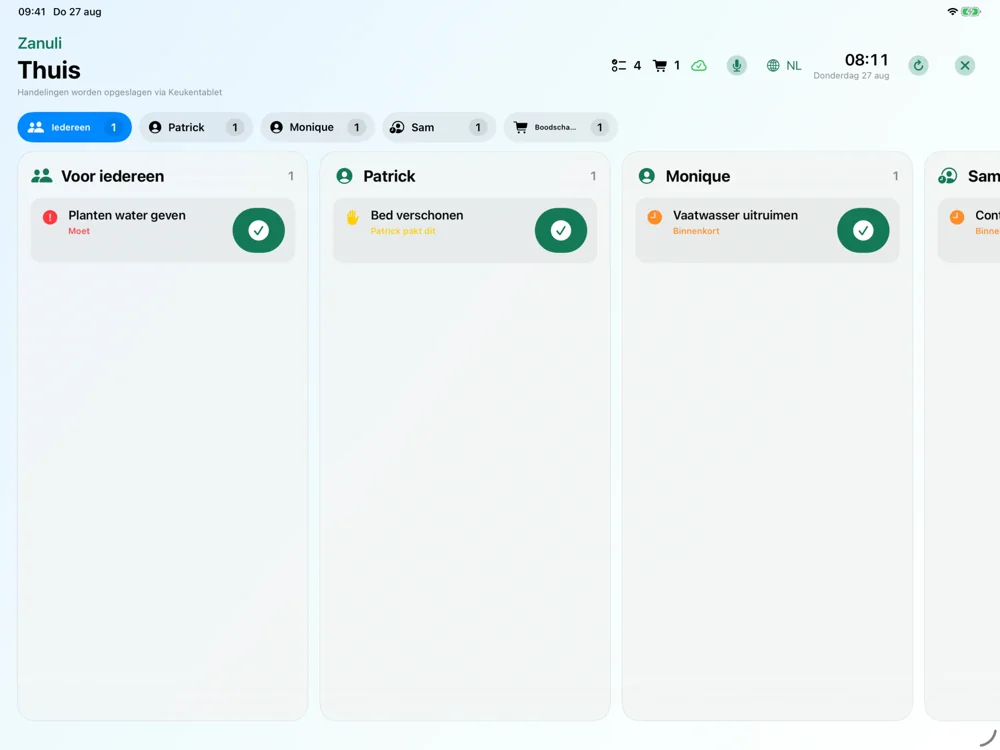
Add a child to your group as a person without a login. They can be assigned tasks without having their own account. A shared kitchen display lets the family see what is ready for everyone.

Under More → My group, add a person without a login using a first name or nickname. This does not create a personal login account.
Choose a recurring chore, such as walking the dog, and set the participants and turn order. Pick work suited to the child’s age and abilities.
See whose turn it is and complete the task for the right person, so the contribution is recorded under the correct name.
Example: Noor and Sam take turns walking the dog. You choose the participants, order and schedule; these names are fictional.
Kitchen Display is part of Premium for your group. You can use it during an active free Premium trial. Afterwards, an active Premium subscription is required; the iPad itself is not included.
Choose one small chore, practise together and agree what finished looks like. Your child knows what is expected without needing their own phone.
Choose a familiar moment, such as before dinner. Start with one box or corner.
Agree on a small step the child can manage. Let children take turns if that suits your household.
Decide together what belongs in it. The child does the task; check together if needed before marking it done.
A parent adds the child by first name or nickname as a person without a login. The parent manages tasks on their phone. With a paired kitchen display, the child can also see what is ready. When checking off a task, check whose contribution is being recorded. Choose chores suited to the child’s abilities; these examples are not age guidelines.
No. A person without a login is a name in your group, not an independent account. Manage tasks through the app or the paired shared display.
Start small: helping clear the table or putting toys away. Choose what is safe and appropriate. Practising together and clear agreements matter more than lots of points.